
SEO & AI Visibility for Shopify
Know why your store is slow.
Know whether ChatGPT
recommends it.
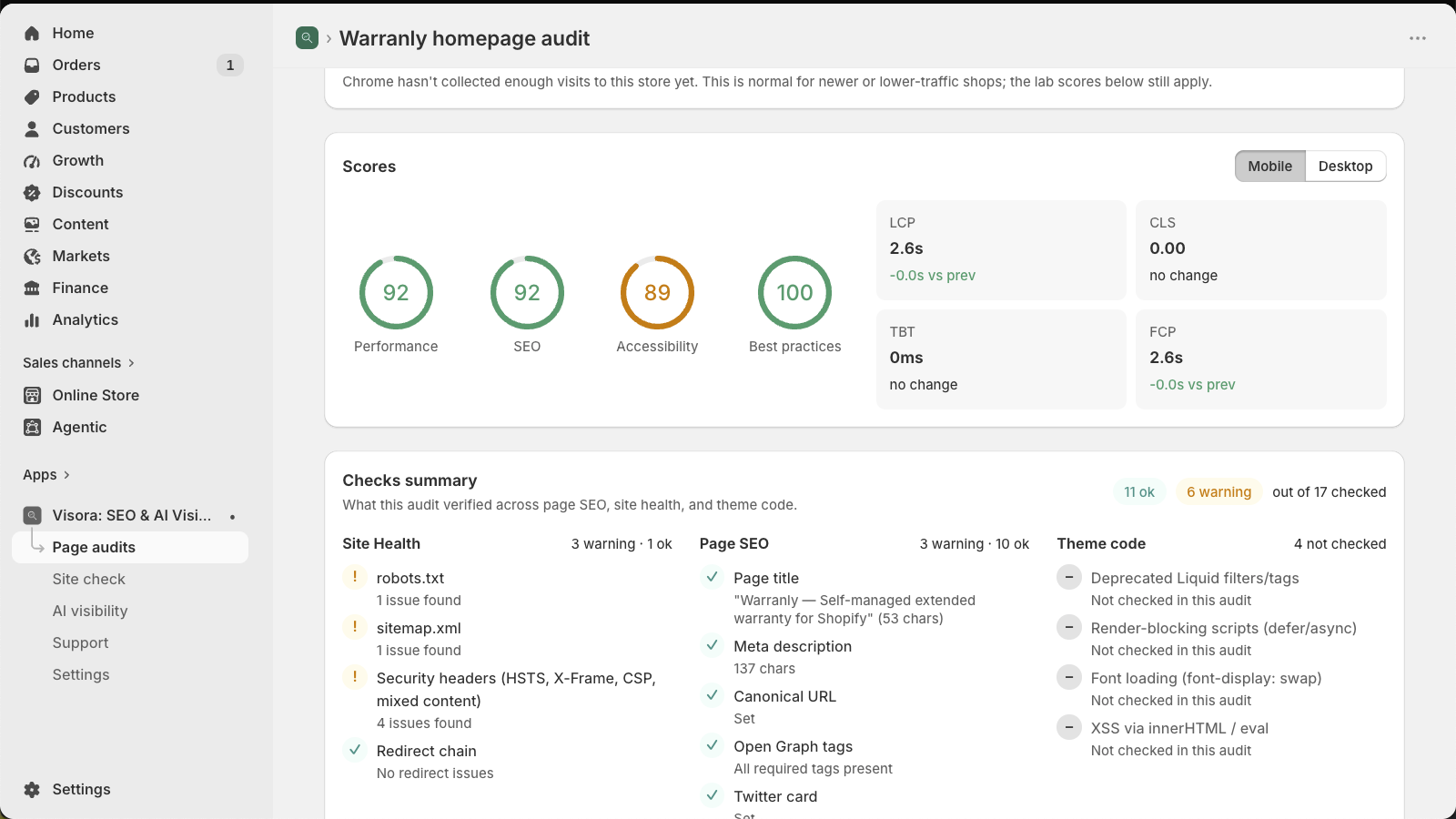
Visora audits your Shopify store like a senior developer would: every page scored, every problem traced to the theme file and line, every installed app priced in milliseconds — and AI assistants asked whether they cite you or a competitor.
Free plan, no card · Read-only, never edits your theme · Billed through Shopify
How it works
-
1
Install and pick a page
Homepage, a collection, your best-seller. Visora runs Lighthouse, reads your published theme, and inventories your apps.
-
2
Read a fix list, not a score
Each issue has a severity, an estimated time to fix, and — where it lives in code — the file and line. Export it as Markdown.
-
3
Hand it over, then watch the line move
Your developer starts from the exact reference. Visora re-audits on a schedule and emails you when a page regresses — or improves.
When shoppers ask ChatGPT “what's the best X?” — does it name you?
More purchases now start as a question to an AI assistant, and every answer cites a handful of stores. Visora asks those questions for you, on a schedule, and tells you honestly who gets cited.
Tracked questions
You write the questions your buyers ask. Visora puts them to a real assistant with live web search and records whether you're mentioned, which pages are cited, and who is cited instead.
Share of AI voice
Per question, over time: how often you appear, at what rank, which competitors displace you. Re-asked monthly, with a spend cap built into every plan.
AI search readiness
Every audited page scored for citeability: Q&A structure, FAQ/HowTo markup, machine-readable facts, and a robots.txt check for stores accidentally blocking AI crawlers.
Off by default. Nothing leaves your store until you turn it on, and every plan has a monthly AI ceiling.
AI readiness
Can assistants read your store at all?
Before content quality matters, four blockers decide whether ChatGPT,
Claude and Perplexity can read and quote a page: a bot-protection wall
answering instead of the page, a nosnippet directive,
content that only exists after JavaScript runs, and robots.txt rules
that shut out AI search crawlers. Visora fetches your pages the way an
assistant does and verifies each one.
Then it works through a checklist per page type — homepage, product page, collection page — down to the GTIN barcode in product markup (how assistants match the same product across stores) and the buying guide on category pages. And when a check can't run, it says so instead of guessing.
Four things other audit apps don't do
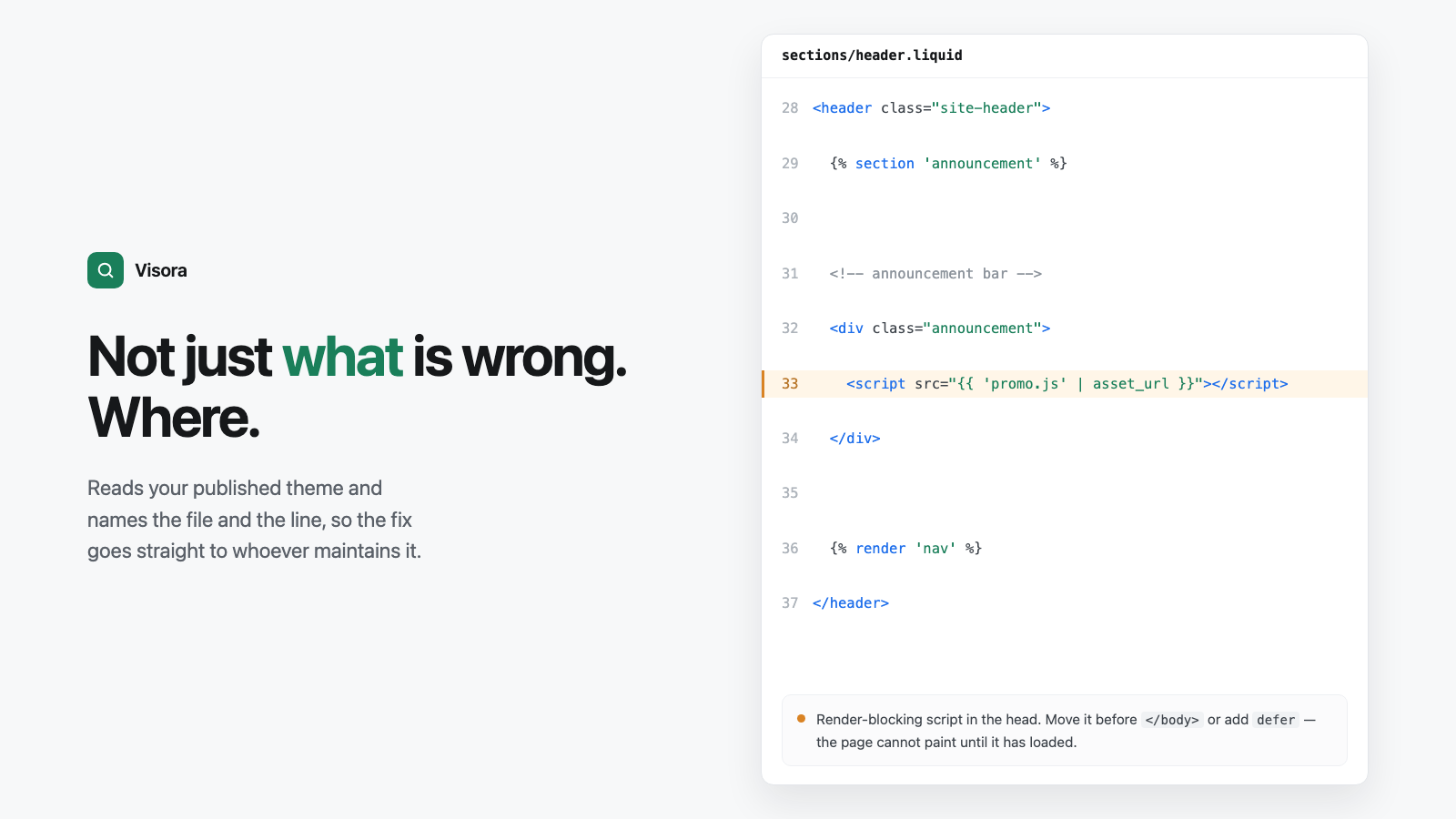
It reads your theme code, so the fix is a file and a line
Deprecated Liquid filters, render-blocking scripts, missing
font-display, unsafe innerHTML — each with
its exact location. Through Shopify's Theme API, never by scraping
your storefront.
It shows what every app costs you in speed
JavaScript, CSS and font weight per app, and how long each one blocks rendering. Enough to decide what to uninstall — and to see what removing it changed.
It measures change instead of guessing at it
Every tracked page keeps its own timeline. Ship a fix, see the line move. Lose ground, get an email saying what dropped — on Pro, with an AI diagnosis of why.
It never invents a number
Real-user Core Web Vitals appear only when Chrome has actually collected them for your store. Not enough traffic? It tells you, instead of padding the gap with zeros.
Theme scan
A finding, not a guess
“Reduce render-blocking resources” is a symptom. Visora shows the script tag, the file it sits in, the line number, and a suggested fix. Your developer starts in minutes, not after an afternoon of searching.
Page audit
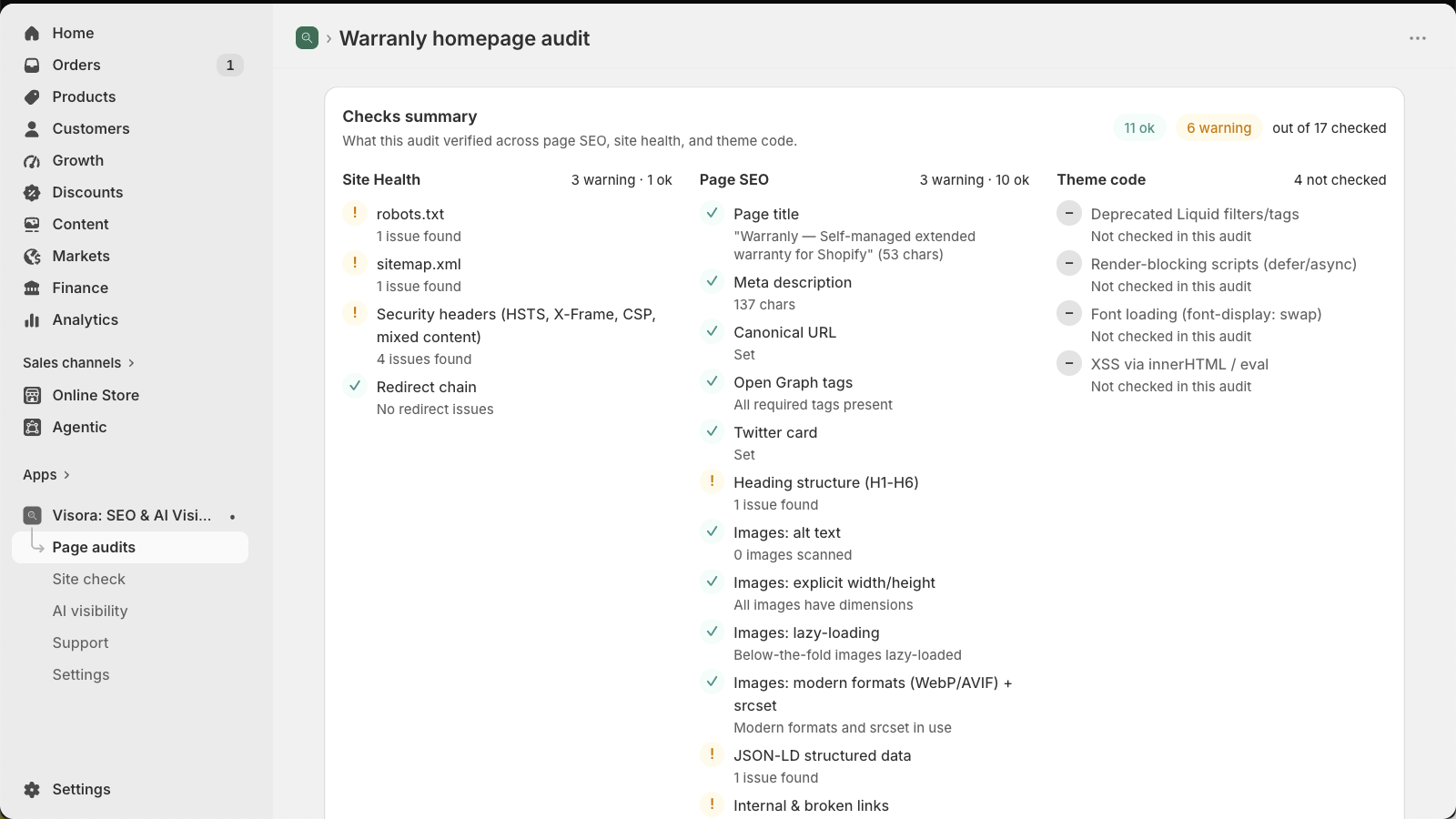
Seventeen checks, each with its evidence
Not a checkmark wall. The audit shows what it measured: your title and its length, your meta description, link counts, alt coverage, canonical target, structured-data errors. Pass or fail, you see the value.
Fix list
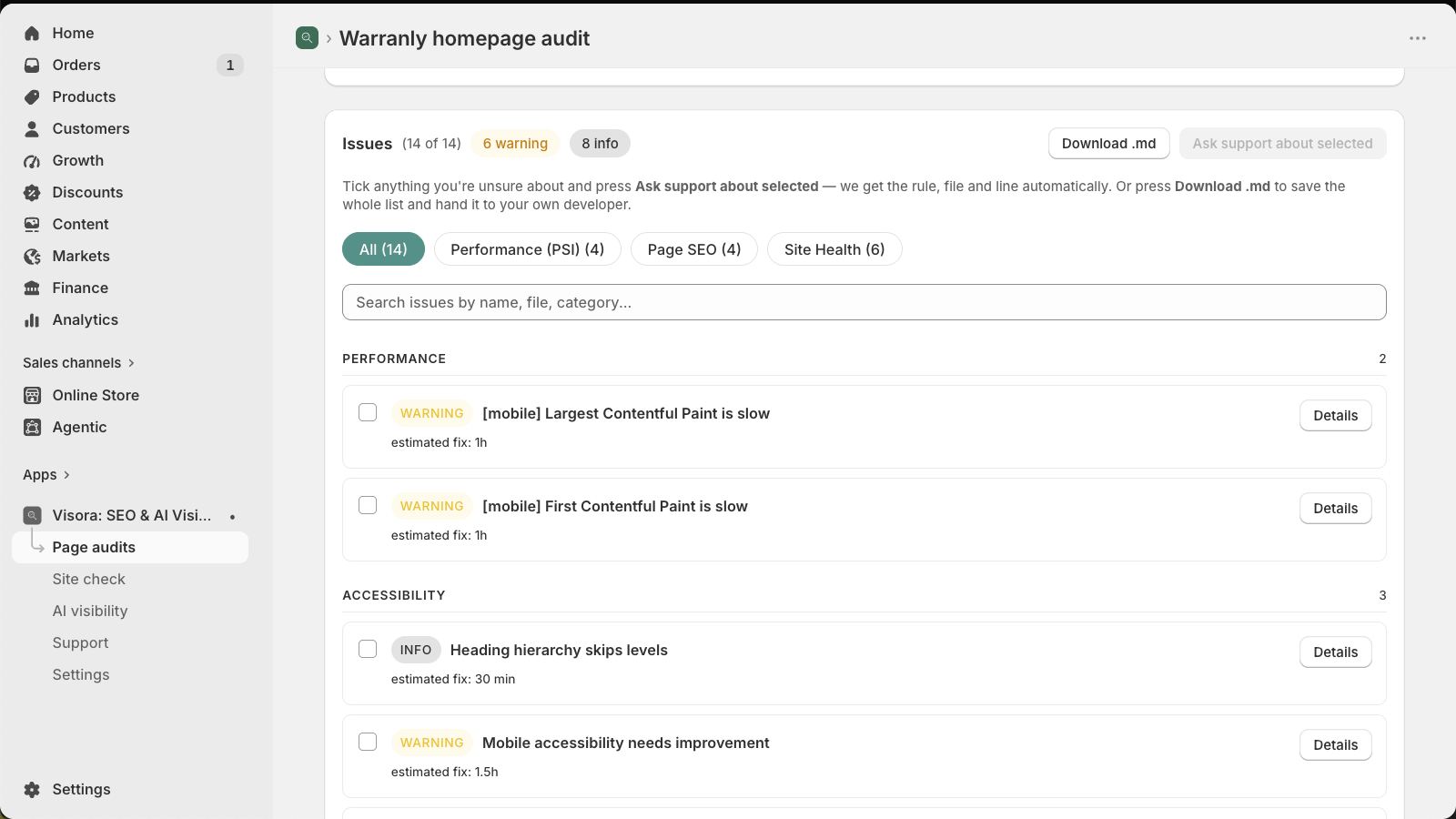
A list your developer can start on today
Every issue carries a severity, an estimated time to fix and — where it lives in code — the file and line. Export the whole list as Markdown with the references already in it.
Tracking
See a slow decline weeks before customers do
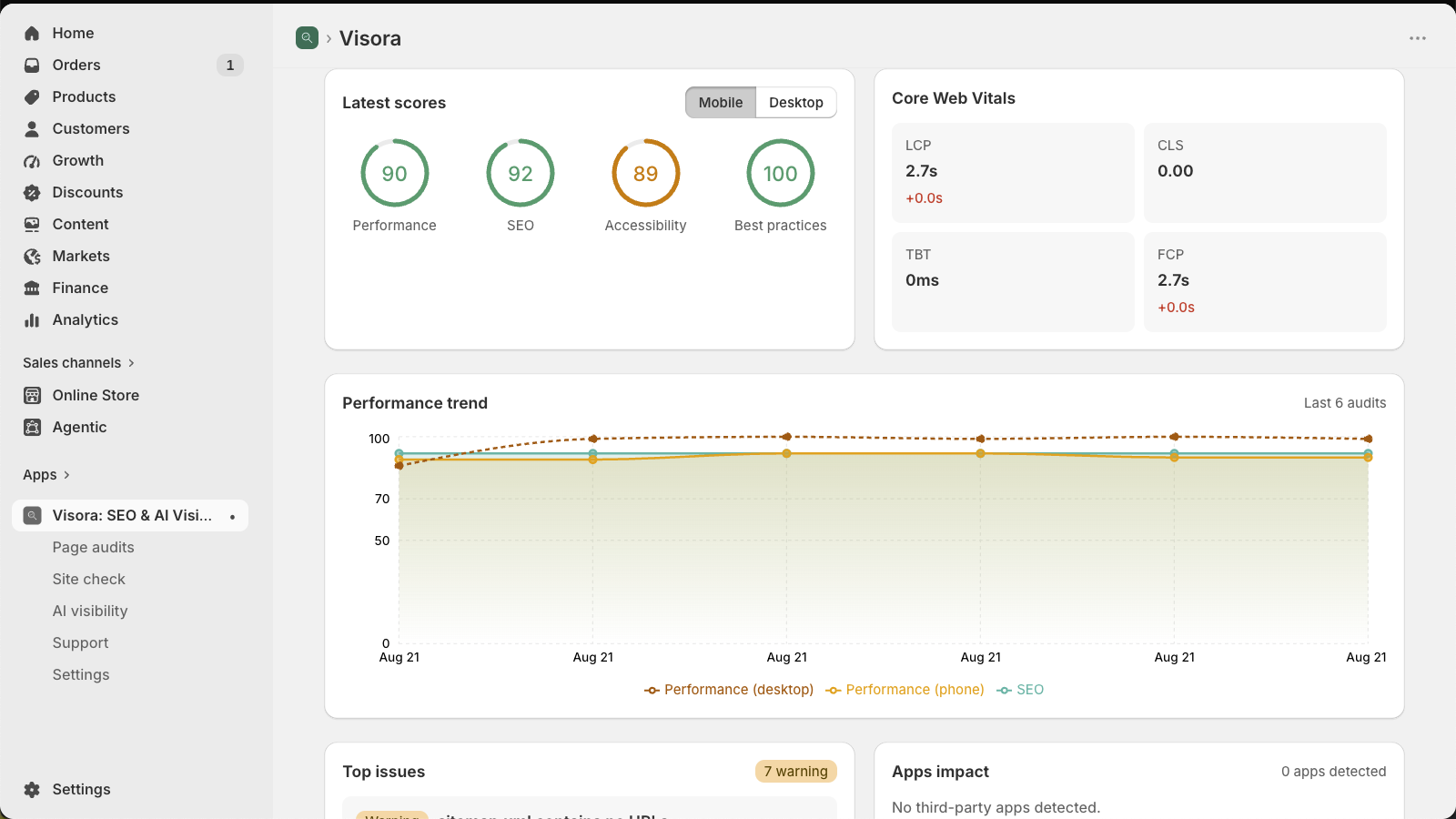
Latest scores and Core Web Vitals beside their history, for every tracked page. Schedules re-audit unattended — weekly on Starter, daily on Pro — and regression alerts email you when something drops. A fix is visibly a fix.
Who it's for
Store owners
Stop paying for “speed optimization” you can't verify. Get a list, hand it over, see the numbers change.
Shopify developers
Skip the afternoon of DevTools. Open the audit, jump to the line, ship the fix.
Agencies
Run the same audit on every client store, export Markdown into your tickets, show the before/after in the client report.
Everything it checks
- AI visibility — whether AI assistants cite your store when shoppers ask, and who they cite instead.
- Page speed — Lighthouse on phone and desktop, plus real-user Core Web Vitals.
- On-page SEO — titles, meta descriptions, Open Graph, canonicals, heading order, image alt text, broken links, hreflang.
- Structured data — JSON-LD and microdata, checked for the errors that stop rich results appearing.
- Site health — robots.txt, sitemap validity, security headers, redirect chains, AI crawler access.
- Theme code — through Shopify's Theme Asset API, never by crawling your storefront.
- Installed apps — per-app weight and blocking time, and which are safe to remove.
- Site check — cross-page problems one-page audits can't see: hreflang symmetry, orphan pages, duplicate titles, sitemap URLs that redirect.
- Competitor benchmarking — track a rival's page beside your own and compare mobile performance.
Plans
One page check = one full audit of one page. That's the only unit. Billed through Shopify, on your Shopify invoice, cancel any time.
Free
Look once
$0
- 2 page checks / month
- 1 tracked page
- Theme code scan
- 60-day history
Starter
Watch unattended
$14/mo
- 25 page checks / month
- 5 tracked pages
- Scheduled audits + alerts
- Competitor tracking
- 180-day history
Recommended · 7-day free trial
Pro
Explain and fix
$29/mo
- 75 page checks / month
- Unlimited tracked pages
- AI analysis + AI visibility
- AI readiness: homepage, 2×/mo
- Site check, daily schedules
- 365-day history
7-day free trial
Enterprise
Volume
$99/mo
- 300 page checks / month
- Unlimited history
- 50 AI visibility questions
- Citation gap analysis
- AI readiness: 3 page types, 4×/mo
- Site check across 100 pages
- Same-day support
Common questions
Will it change my theme?
No. Visora is read-only. It reads your published theme through Shopify's API and never writes to it.
I already use a speed app / Google PageSpeed. Why this?
PageSpeed tells you “reduce render-blocking resources”. Visora tells you which script, in which file, on which line of your theme, how long it blocks rendering, and which app injected it.
Do I need a developer?
For code fixes, yes — or use the export to brief one. Many findings (heavy apps, missing meta, broken links) you can act on yourself.
What goes to AI providers?
Nothing until you enable AI features. Then only the questions you write and the public text of pages you audit, under the monthly spend cap built into your plan.
Does it fix things for me?
No, and that's deliberate: apps that auto-inject “optimizations” are often the render-blocking scripts we flag. Visora finds; you or your developer fix. There's no agency upsell and no marketplace — the fix list is yours.
More in the full FAQ — permissions, data handling, why a score can differ from PageSpeed Insights.
I've spent eight years building and fixing Shopify stores for clients. Every speed audit started the same way: an hour in DevTools finding which app or which line was the problem. Visora is that hour, automated — and, since shoppers started asking ChatGPT for recommendations, it also answers the question every client now asks me: “does AI even know we exist?”
See what your store has been hiding
Install, pick one page, and read your first fix list in about three minutes. Free plan, no card, never expires.